


- One thingThe full list stays behind a button.
- Your lengthNo compulsory twenty-five minute block.
- A cue that arrivesPhone delivery has a self-test.
The short version
- One thing in front of you. The full list stays behind a button.
- No fixed block length. You set the length.
- Four optional starting points, or four direct choices. Every option says what Den will do.
- On Android, the cue is built to arrive even with the screen off. Apple devices use AlarmKit where available, with a local notification fallback and Live Activity. Both phone routes have a self-test.
- Keep an eye on… is a separate return-to-it alarm for dinner, the bath, or anything else that must not vanish while you do something else.
- Tasks can be dictated. Siri can add one or start a keeper, and the focused Apple Watch companion supports dictation too.
- No account is required. You choose whether to sync, share or export your work.
- No streaks, scores or red badges. Nothing to keep up.
- Two devices stay in step, once paired.
- A signed Android download from this page, checked against its published SHA-256 sums.
What it looks like
Three screens from the Android app, running. Nothing here is a mock-up.
-
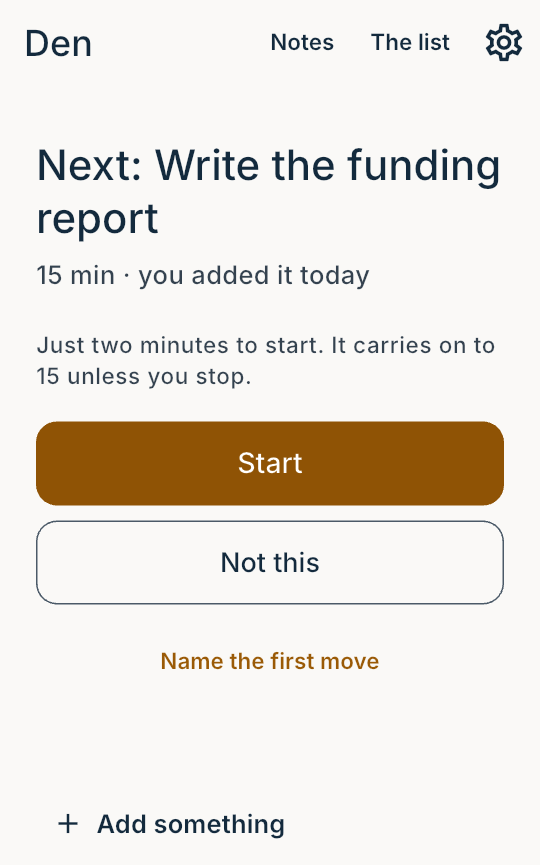
One thing, and a way to say no to it. The list is behind a button, not in your face. -
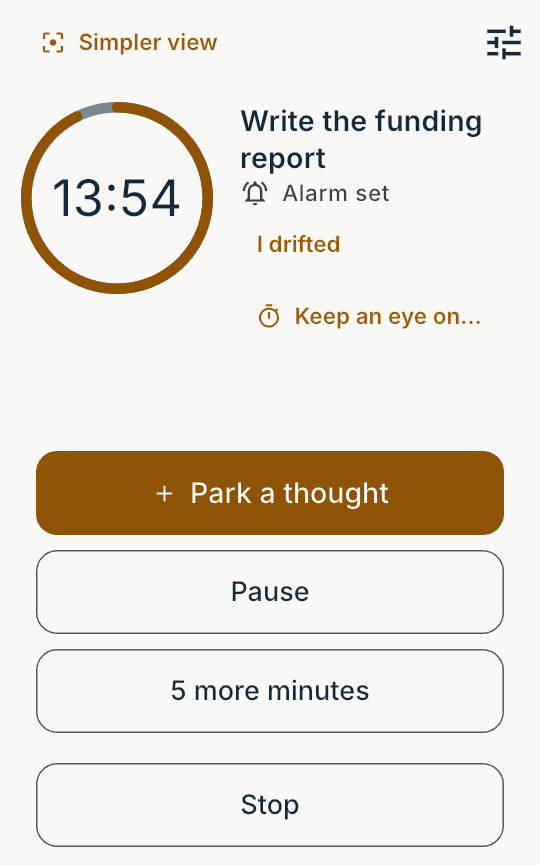
The first two minutes are a door you can walk back out of. A stray thought goes somewhere without ending the block. -
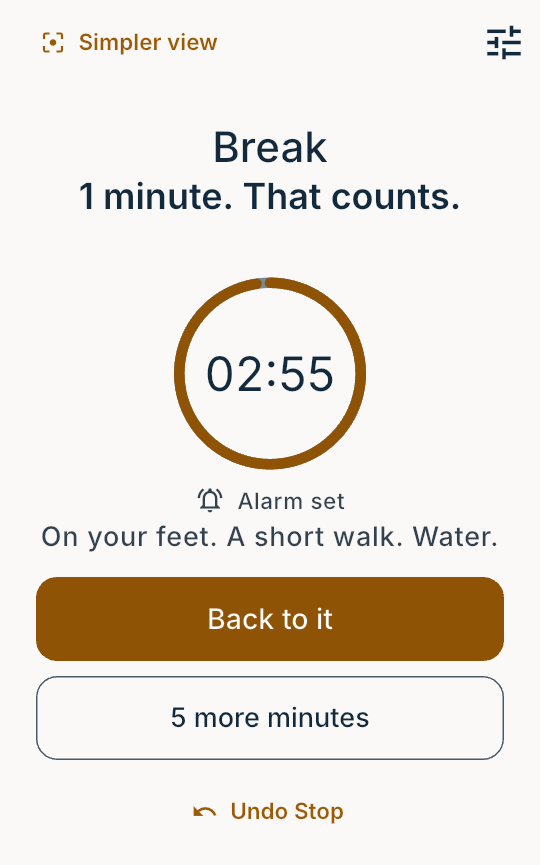
A block that lasted one minute is still a minute. There is no score to lose and no run to protect.
What gets offered
You can say how heavy a thing feels: light, normal, heavy, or not saying. It describes the job, not you, and nothing is scored or added up.
Before you have started anything on a given day, a light one is offered first, and Den says that is the reason. After the first block the order goes back to normal, because always leading with the easiest thing is a way of never doing the hard one.
How long a block lasts
Most timers give everybody twenty-five minutes. That number came from a kitchen timer in the 1980s, and nobody has shown it is the right number for anyone. The few studies that put it against other ways of working disagree with each other, and none of them found a difference in what people actually got done.
Den has no fixed interval. You pick a way of working, and that sets a starting length. You can change it whenever you like.
Den measures nothing except the clock and your own taps.
Four ways of working
These are starting points, not categories. Every setting underneath is adjustable on its own. Nothing you pick is stored as a fact about you.
Short blocks. Cues that vary. A firm end.
Long blocks. Cues that never change. An end you are warned about, and can run past if you want to.
The same ritual every time, around work that changes.
One length. One cue. Everything above switched off.
What you can change
A preset sets a dozen or so things at once. In Settings, under "Every part of it", each is a separate choice with its own explanation. Among them:
- How hard a cue pushes. A buzz and nothing else, at one end. At the other, an alarm that takes the screen and keeps asking until you answer it.
- Whether a repeated cue varies or stays identical. Some people would rather it never changed. Some would rather it did. Those pull opposite ways, and nothing measures which is you, so it is yours to set rather than ours to guess.
- What the end of a block does. It can end the block, or it can say the time has passed and leave the clock running.
- How Den words things. There is a setting in which nothing in the app is phrased as an instruction. "It is there", where it would otherwise say "Start". If being told to do a thing makes you want to do the opposite, that setting is there for you.
- The longest a block may get, and how much runway there is before one begins.
Appearance has its own choices: light or dark, and a personal background photo. Remove the photo or reset the appearance whenever you want. Your background stays local and is included in exports.
Nothing has to be answered before you start. There are four direct choices that set these behaviours at once. Every option says what Den will do before you tap it, and the card offering them has "Not now" on it. Neither route stores anything as a fact about you.
Making sure the cue arrives
Every other feature is worthless if a cue goes missing without saying so.
On Android, Den runs a foreground service with a live countdown in it. It also sets an exact alarm alongside. The alarm is held by Android itself, so the cue still arrives through Doze, and it still arrives if Android reclaims Den to free memory.
What no app can survive is a phone that force-stops it. Some manufacturers do this by default to save battery, and it cancels pending alarms. That is not something Den can fix from inside. It is the reason the test below exists, and the test names the setting.
On iPhone, the end cue is a local notification and the running block has a local Live Activity on the Lock Screen and Dynamic Island. Neither needs a Vitark server.
Keep an eye on…
This is not another task list. Choose a length; a name is optional. Den keeps each countdown visible, several at once, and uses the strongest normal timer route the device allows. On iOS 26 that is AlarmKit; older Apple devices use local notifications. Android uses its exact-alarm route.
It is for things such as dinner in the oven, not a fire-safety system. No phone or watch alarm replaces checking something dangerous.
The self-test
There is a test you can run. Lock your phone and put it down. Den cues you sixty seconds later.
It reports pass or fail plainly. If it fails, it names the setting that stopped it where the phone exposes one. On Android, that includes the vendor-specific battery settings some phones use to stop background apps.
The cue was run on a Pixel 10 Pro XL at version 0.8.4. It fired through Doze with the screen locked. Since then each release has been checked on an Android 15 emulator, which can show what Android holds but cannot reproduce a manufacturer's battery manager. That is the gap the test above is for.
Keeping track of several things
Notes
Keep a link or a piece of text without making it a task. Paste and save it in Notes, then open Den on a paired device and tap Copy. Notes can be searched, edited and backed up. Separate edits keep their versions until you choose which to use. Den does not watch copies made in other apps.
Threads
A thread is a commitment of time, like an hour a day of something. Den compares the hours a thread asks for against the hours you have actually recorded, then shows you the arithmetic.
Hard dates
A hard date is something fixed, like a return or a flight. Den works out the day it has to start. It uses the hours left over after your threads have taken theirs.
Coming up
Some things have to happen before another thing can. A conference is the usual example. Those earlier things can have dates of their own, and Den says so when they do. Something that fits overall can still be at risk.
There is no ordering, no percent complete, and no deadline on a thread. A thread cannot be late.
What happens to your data
- No account is required. Your local work stays on your device unless you choose to sync, share or export it. The privacy policy explains each connection and what its recipient can see.
- Export is plain files. Ordinary JSON with documented
field names, a table you can open in a spreadsheet, and a
SHA-256manifest for checking nothing has been altered. The Android app writes a folder of them. iPhone hands you one file with the same contents nested inside, and say so in a note at the top. Either way, if Den disappeared tomorrow what you have is still readable in a text editor. - Personal sync is optional and encrypted. Den ships with no relay of its own. List sync uses the relays you add in Settings, and separate block-history sync also uses a storage host you choose. Both receive encrypted records and can see connection metadata.
- List sync excludes your settings. History sync in releases up to 1.3.2 included profile and timer settings inside the encrypted block record. Version 1.4.0 corrected that. Read the history-sync version note before using that separate feature.
- Your keys come from twelve words. On a phone you can connect an identity you already have, or make one. Den keeps only the keys it needs, worked out from those words, and never the words themselves. The keys stay behind the phone's biometric lock. Two phones that connect the same identity are in step with each other without anything being paired.
- Connect devices with a short code. The new device shows six characters. Enter them on the device that already has your Den, then compare the six digits on both screens.
- Keep your Den recovery words. If you use Den without a connected identity, Settings offers 24 numbered words for its existing key. Keep them private and save a backup file too: words restore access, while a file keeps your notes and history.
Nothing is scanned at any point. Den has no camera permission, so it cannot read a code off a screen, and six characters are cheaper than a permission that would need explaining for ever afterwards.
What Den cannot see
Den asks for no permission to see which other apps you run. It asks for no location, no camera and no microphone. It cannot know what else is on your screen, and it does not ask.
What Den does not do
- No streaks, points, levels or scores. Nothing accumulates, so there is never a run to protect.
- No due-date badges, and no red. The word "overdue" appears nowhere in it.
- It is not a website blocker. Nothing is ever locked away from you.
- It is not a task manager. Three states, and a shortlist that stops at three.
- It is not a coach. No encouragement, and no personified assistant.
- It is not a co-working room. Nobody else is in it. There is no shared session, no one watching, and nothing of yours is visible to anybody else.
- It is not a medical device. Den does not diagnose, screen, treat or monitor anything. Its optional setup choices change app behaviour; they are not scored and produce no result about you. Den makes no claim about any condition.
Getting Den
Den for Android is a signed download from this page. There is no subscription, no account, no advertising and no feature paywall inside it.
23.0 MiB. Suits almost every phone sold since about 2017. Older 32-bit phones and emulators have their own files below.
All three files, with their checksums
- vitark-den-1.7.0-arm64-v8a.apk 085003df34af7894e40def726d696c738bc8f7920d2395767a104f66a476323e
- vitark-den-1.7.0-armeabi-v7a.apk 23d630ac847eafe266f51ef7352edf67ce708a9eda0b542c9e7b40e60c39aae5
- vitark-den-1.7.0-x86_64.apk c601ffa309a19317d0c5fa1603efd9981b90b5bdaac9893d2a784bb93d2eb546
The long strings are SHA-256 sums of the files themselves. Running
shasum -a 256 <file> should print the same thing. There
is a plain list of them too.
Installing
Your phone will ask you once whether to permit an install from the browser. That prompt is Android doing its job. You can turn the permission off again afterwards.
The same signed build is published on GitHub, for GrapheneOS and anyone who prefers to fetch it there. A copy of Den installed from a store is signed with a different key, so this one cannot update over it: to switch, export your work, uninstall, then install this one.
What the Android download asks for
The permissions are checked against the release file before it is published, not against a manifest someone remembers writing.
Present: vibration, notifications, wake lock, a foreground service, an exact alarm, network access for sync, and the biometric prompt. That last one is what lets your phone refuse to unlock your keys without your fingerprint.
Absent, and verified absent: app-usage access, the package list, location, microphone, camera, logs, contacts, external storage, and drawing over other apps.
Android's own backup is switched off too, so the phone does not copy Den's files to anyone's cloud behind your back. That is checked against the file before it is published, like the rest of this list.
What works today
This is version 1.7.0. The Android build here and on GitHub carries the same certificate as every release since 0.1.0, so it upgrades an existing direct install rather than replacing it.
A direct install has no shop to tell it a new version exists. Settings names the version you are running, and asks the site for the current one when you tap it. It never looks on its own. What changed in each version says what is in them and whether any of it is a reason to update.
Installing a new version keeps everything. Open the download and install it on top of the one you have. Your list, your threads and your history stay where they are. Do not uninstall Den first: there is no copy of your things anywhere else, so uninstalling takes them with it.
In this build you set the block length yourself. Den does not yet work a length out from your own history. That is the next phase of work, and it is not in the version you can download. Rather than show a number and let it look calculated, Den leaves it as a number you chose, and every record it writes says so.
Everything else on this page is here: the launchpad, the two-minute door, the optional first-move handoff, the runway, the three-state list, break, threads, hard dates, and the self-test.
Den is part of the Vitark suite, alongside Still and Train. They record what you actually did, a breath or a ride or a block, into an archive you hold. They propose rather than impose, and they show their working. None of them keeps your data on infrastructure Vitark controls.